
3 November 2026
How to Check Your Homeschool Curriculum Coverage
The quiet worry behind a lot of homeschooling is the gap you can't see. You've done plenty of good learning, but have you covered what your state expects? And how would you know before someone asks?
Homeschool-HQ answers that with a live coverage map. It builds itself from the lessons you log, so there is nothing extra to fill in.
Every subject, one bar
The Curriculum Coverage screen lists each subject with a bar and a count: how many of that subject's curriculum codes you've covered so far, out of the total.
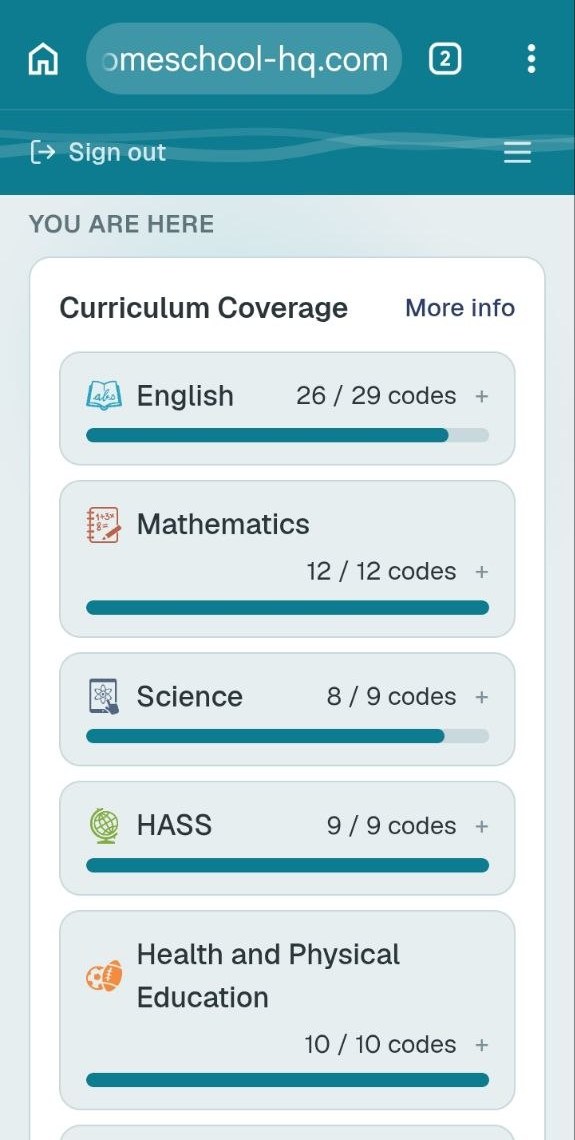
That's Sarah's account late in her year. Mathematics shows 12 of 12 codes, HASS 9 of 9, and Health and Physical Education 10 of 10. English is at 26 of 29 and Science at 8 of 9. You can see in a moment which subjects are complete and which still have a little room.
What "covered" means
A code counts as covered as soon as any one activity that matches it has been ticked. You don't write anything special for it. You log the lesson in ordinary words, the activity is matched to your state's curriculum, and the bar moves.
Coverage tells you what you've touched, not how well it landed. That part comes from the ratings and notes you add to each lesson, and from the Teaching Insights built on them.
Tap a subject to see what's left
Tap any subject and it opens into its learning areas, each with its own smaller bar. Open a learning area and you'll see:
- Still to cover: the activities that would cover a code you haven't reached yet.
- Extras to try: other worthwhile activities. They won't change your count, but they're good to have in your back pocket.
So the map doesn't just say "26 of 29". It tells you what to do next to get one step further.
Reading it sensibly
- Unequal bars are normal. Some subjects suit a short burst of focus. Others come up in everyday life all the time.
- It's a map, not a race. The point isn't to fill every bar by a deadline. It's to avoid being surprised, and to spot a quiet subject while there is still time to give it attention.
- Use it to plan. Looking at the "still to cover" list on a Sunday evening makes next week's lessons much easier to choose.
- Check what your state asks of you. Requirements for registered home educators differ across Australia, so use the map alongside your own state's guidance.
How it fills in
The map grows from the same weekly habit as everything else: log your lessons, glance at your week, and watch each subject add up. After a few months, that routine has turned into a clear picture of where you are.
It's also the kind of dated, organised evidence a registering authority may ask to see when it reviews your home education program, and the detail sits in your Learning Summary report.
If you'd like to see the map fill in with your own child's lessons, you can get started here.